I had to take some time off from documentation and my software development learning journey.
Since my last post:
– Kasper and I finished the wooden ghetto blaster…
It looks dope and so do we!
– I’ve been contracting solo, taking on residential electrical jobs
Other electricians keep me busy
– Doing my taxes as a business owner, for the first time.
Figuring out how to file my taxes was a learning curve. I’m glad I did it myself though. The whole system was such a black box to me before, and I’ve never met an accountant that was both willing to work for me and I could trust. Now that I have the jist of it it will be way easier next year. I could see myself maybe hiring someone to double check everything next year, if it’s a profitable one.
– Went to Fosdem in Brussels…
Fosdem
– Ate some waffles
yum
– Attended a Brexit protest in front of the European commission, organized by a British acquaintance of mine.
– … Stopped in Amsterdam on the way
Highly recommend visiting Amsterdam. If I was younger I’d definitely move there
Registered for some distance learning courses. Currently doing High School chemistry, physics and calculus. I tell myself that it’s for review but to be honest I never put that much effort into learning this stuff back in the day. The plan is to get good enough grades to qualify into the engineering program of the university of Iceland. Although after fosdem I’m beginning to think that self learning may be a better way to go. I’ll register for University for next fall and then see how things unfold for me until then.
Leo is my most welcome distraction from productivity. He’s my youngest son and he makes people happy with his presence. It’s hard for me not to look up from my laptop with a smile after about 45 rapid-fire questions about Dyson spheres and nuclear fusion… Things that I scramble to google for, while he’s asking me, because Dads are supposed to know everything, right?
He loves this thing
He has always been this way. A part of what makes him so special is that he takes pleasure in the most unexpected things, while shrugging off others that other people usually like. He doesn’t really like movies or TV, but he can sit through hours of audiobooks. He has always become quickly bored with fancy toys but will seek out bottle caps and rare coins. He hates eating out at restaurants but will happily play in a water pool for 4 hours.
Fortnight and Pilates
He is unfortunetly hooked on Fortnight like every other 10 year old, and for a while was developing terrible posture, slouching over his controller on the couch. His mom got him a yoga ball and he instantly started sitting on it with perfect posture while playing on his Xbox. In between rounds he inadvertently does core exercises by balancing and planking in strange positions, on the ball.
Leo picked up chess quickly when I taught him, but it bores him. He humors me sometimes and agrees to a game, but often modifies the rules to make the game more exciting to him. The version pictured above is called Zombie Chess. It’s actually really fun. When a piece is captured, the piece that made the capture leaves behind a zombie version of the piece that he just captured, in its own colour. The Zombie piece’s only limitation is, that when it is captured, it does not leave behind another zombie piece. Leo came up with that all on his own!
In an effort to make oatmeal more exciting I started making it taste sweeter. I taught Leo the recipe the other day; oats, milk (instead of water), sugar, bananas and peanut butter. He used to like it before he saw how unhealthy the ingredients are. He now says that he prefers the “healthy kind”.
Assembling his xmas present
Another thing that makes Leo so special is his interest in others. He genuinely likes to hear your story if you sit down with him and talk to him like a person, and not a kid. But be careful. He will remember everything that you casually tell him about your work politics, embarrassing stories from your own childhood, or trivial facts about sleep-walking.
I’d forgotten how convoluted USB protocol and power regulation can be, and how the Raspberry Pi doesn’t usually help matters. After I powered the Raspberry Pi up, with the external SSD plugged in, for the first time, I ran sudo fdisk -l command via SSH. It showed a list of the SD card drives (root and boot), but got stuck when trying to read the SSD. I couldn’t even ctrl+C out of the operation.
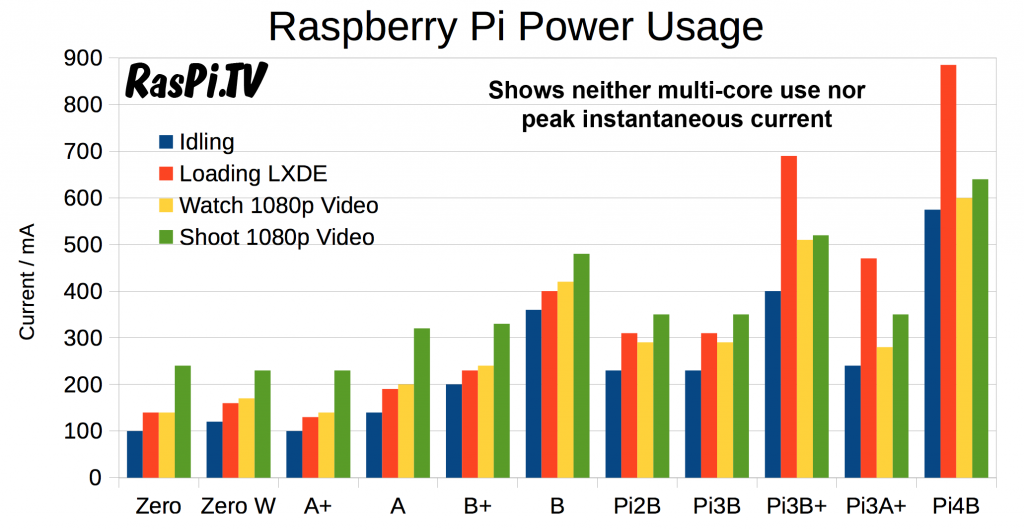
How cool is it that someone took the time to make these measurements???
I first jumped to the conclusion that the external SSD was drawing too much power at about 900mA. That seems like a lot, but USB hubs with separate power supplies, that could potentially serve as an external SSD PSU are also expensive, and can be flaky when handling the client/host power draw negotiations. Apparently the USB ports can easily supply 1A of power. The cutoff seems to be 1.5A, with 1.2A the nominal running max. So my measly 0.9A drive is probably not the cause. My USB C charger is 3A, the cooling fan consumes 0.3A, at the very most, and the Pi itself can draw up to about 0.9A when doing something terribly fancy (see chart above). So my worst case scenario power consumption should be far below the USB port limit and the Power Supply limit, which is 3.0A:
Raspberry Pi .........  900mA
Cooling fan ..........  300mA
External SSD .........  900mA
-----------------------------
Total Consumption .... 2100mA
Out of desperation I booted the SSD on my laptop and changed the drive from NTFS to ext4. This time the Pi had no trouble running the fdisk command. That surprised me, but I guess the pi really needs some tlc for NTFS to work properly. Check out raspberrypi.org for more on that subject:
While reading about the various issues that the Pi 4 has with UAS devices, I came across several posts complaining about issues they were having running SD600Q USB 3.2 External Solid State Drives with their Raspberry Pi 4’s… I guess I probably should have done some research before rushing out and buying it, but I mean, what are the chances???
So I was just telling my son, Kasper that the psu we installed in his box had 3 different voltages that he could use: 3V, 5V, 12V, but I wasn’t sure which color is which. The following schematic should help with that.
ATX pinout
As we can see the green wire (fourth from top-right) is the one that we shorted with the “common” (negative) for an always on power supply.
Black = “Common” = 0V = GND
Orange = 3.3V
Red = 5V
Yellow = 12V
I guess that technically the “common” is not “negative”, it’s 0V, or “ground”. Funny how difficult it has been for the scientific to educate people about electricity and popularize coherent terminology for polarity and voltage. Once when a teacher of mine was asked by another student how voltage works, the teacher replied “voltage is like love. It’s both there and it’s not there. It’s real, and it’s not real”.
I wonder if one could run a regular 12V device by connecting 0V to the positive terminal and -12V to the negative terminal. The potential difference would be the same and flow of electrons in the correct direction. Hmmmm… Well, I probably will need to experiment with that on something one day.
The stereo we ended up picking up is a used Pioneer, model: DEH-S1100UB
DEH-S1100UB
The speakers are Alpine… I probably should have taken note of their ratings. Quite small, whatever they are. The other ones I saw were actually much too big for the car stereo.
We also got a small Alpine 3540 amp that may or may not get installed some time soon.
I’ll probably update this post late with some useful links to manuals and stuff, but too little documentation is better than no documentation
I should emphasize that Kasper has done the lions share of the work on the box. It’s been a great learning opportunity for the both of us.
The fan just connects to 5V+ and GND pins. I used pins #4 and #6
Creating the SD card was no problem. I downloaded the latest raspbian lite, popped the SD into my Ubuntu laptop. I used Ubuntu’s “Startup Disk Creator” tool to… create the startup disk. After that I did the following to start it up headless:
create a file called SSH on /boot partition
create a file called wpa_supplicant.conf with the following content:
Put the SD card into the pi, power it up and log into it using terminal
ssh pi@raspberrypi.local
If you remember from a couple of posts ago, I’m not super keen on running a server from an SD card, so the plan is to figure out a way to run Raspbian from an external SSD. Let’s hope USB3 is fast enough to not get annoying. We’ll soon see…
I went to Memory Express yesterday to take advantage of their Boxing Day sale. It was ok. I got what I intended to get at a slight discount. It took about half an hour / hour to stand in line to get to the cashier. Not really worth it. But the staff are nice and helpful
My first objective was to fix my son’s old Pixel phone, to give to my other son. Although the tiny torx screwdriver set was a worth-while purchase for me, the pry tools that came with the tool set were useless. I tried using my Leatherman blade to pry the glass from the phone, but that ended up cracking the glass with very little force. Realizing that this project was a flop, I proceeded to try other methods of prying the glass from the phone, for practicing purposes. A box-cutting blade does the trick quite nicely.
Live and learn
As it turned out I ordered the incorrect replacement motherboard for this Pixel. If I hadn’t done that I’d consider buying a replacement glass and digitizer for it, so I quickly threw it out so I’d stop spending more time and money on it. I like fixing things even when it doesn’t make sense, but sometimes you really have to just stop. Speaking of fixing things, if you’re into that sort of thing and you find yourself in Reykjavík, check out the Tool Library and their monthly repair cafe. Before I got so busy with paid work, I used to volunteer there. It’s neat.
During my failed operation my son sat on the couch writing about things he is grateful for. He told me that his list is as follows:
I’m grateful for my friends
I’m grateful for my family
I’m grateful for this notebook
I’m grateful for the Lego I got
I’m grateful to be alive
How can I stay unhappy after hearing that?
Leo and I finished his new Star Wars Lego ship today. That was actually really fun
Well, the box is done. The woodworking part, anyway. Kasper has some sanding and painting ideas, which I fully support, in spirit, but for my part, the enclosure for the weird car stereo system is done.
Shelf for stereo, inside box
We had to plug it in for the joy of… well, plugging in the strange thing that we just made, and see the PSU fan spin and stuff.
Thirsty cat
Ofcourse the PSU-ON & COM wires needed to be cut and shorted for the psu to start…
Butchered ATX connector
That’s all she wrote for the box for now.
In the mean time the other boys finished the rest of the star wars trilogy. I hope we can all go see the final episode tomorrow after Kasper is done work.
Today I built a box, with my son, out of wooden boards from home depot. We didn’t quite manage to finish it, but we made decent headway.
The box has a top lid with hinges and a built-in desktop power supply, which we’ll be using as a 12V rectifier for a car stereo.
What’s this got to do with software development? You ask. I’m glad you asked. Absolutely nothing.
What a strange project to occupy your time with, you say. Yes.
It’s Christmas time and I haven’t seen my kids for a while so they come first. I also took my other boys swimming and watched Star Wars Episode V with them. Stay tuned for more excuses for why I’m not programming.
I’ve been traveling a bit recently, visiting friends and family. Before my initial departure I had about a bazzillion and 1 thing to do. I’m currently waiting at the airport for my next flight. I’m considering changing this blog into a webpage devoted to my bazzillion and 1 excuses for not attending to one of my alleged life’s passions, software development.
It’s been fun walking around downtown Seattle. From people’s conversations (I don’t like eavesdropping but Americans speak in very loud voices) it seems that every second person works in software development.
I didn’t manage to set up a reverse proxy before I left, so I ripped the ssd out of the kitchen server and grabbed an old raspberry pi. I’ve decided that setting up random software packages onto the base kernel is bad form. I’ll be setting up a server and focusing more on VM’s and containerized solutions before setting up proxies, tunnels and web pages. My next server will be a Pi. It fulfills my highest priority requirements:
portable
dedicated physical hardware that I can touch
relatively cheap
There are a few things that give me pause about using a pi, aside from the obvious CPU and memory restrictions. The onboard SD card is used as native storage for the OS root directory and subsequently all read/write intensive applications. SD cards can be very unstable for that kind of thing, depending on what you’re doing. I’m going to explore the possibility of using an external solid state drive with the rpi. That may be unrealistic. We’ll see. If it turns out badly, maybe a higher end micro-computer is the way to go.
“regardless of how good the error correction is on your little piece of flash memory, sooner or later it will corrupt”
I found a tutorial on how to boot pi3’s from USB. It may be worth trying out once I’ve landed. It looks like doing the same on a RPI4B is going to be a bit more challenging, according to this reddit post. I haven’t had the time to acquire one of them. Eventually, though. Whellpp, time to board. Ciao!
I created this blog and share it with people I respect in order to create an element of accountability of my learning journey.
Right now I’m writing this in my coffee break in an industrial bakery in Reykjavík where I’ve been contracted as an electrician. That’s my day job. I’m a certified master electrician and take jobs as an independent contractor.
I like it, to a degree but it doesn’t fulfill my desire to be creative with technology.
Since my last post I’ve been reading, and toying around with reverse proxies. I think they are an incredibly powerful tool for remoting into administrative consoles that are intended to be on internal networks.
I might find that I’m chasing the wrong technology for my disired solution, but it’s a fascinating technology and I’m learning a lot.
I stared out tinkering with Tinyproxy but soon realized that it’s built on Nginx and I’m better off mastering of it directly, rather than working with someone else’s product. Tinyproxy might be something I migrate to later if it’s worthwhile. I guess some people say it’s set up in a way that’s more convenient for containerization.
I found this medium post, by a fellow learner, great for becoming familiar with the vocabulary I’m missing for some of my ideas:





 keep documenting